Resetting Netmo 2
There are two ways to reset Netmo 2. Which one fits depends on whether you can still use the app.
Delete settings when signing out
If you can still use Netmo 2, this is the easiest way:
- Click the sign out button in Netmo 2.
- A dialog with three choices appears: keep settings (the default), delete settings, or cancel.
- Choose to delete settings.
This resets the settings on this Mac and removes the settings stored in iCloud. The empty state is not sent to other Macs. Other Macs keep their settings and upload them to iCloud again at their next change.
If you choose to keep settings, you are only signed out. Your settings stay on this Mac and in iCloud. Your settings are also kept if Netmo 2 signs you out automatically, for example after repeated connection errors or a failed authorization. This happens without asking.
Reset all settings at launch
If you can no longer use the app, reset everything right when it launches:
- Quit Netmo 2 completely. If the app is nowhere to be seen, it cannot be quit normally. In that case, quit it as described in the article Activity monitor (found under Applications > Utilities). Look for “Netmo 2” in the list.
- Press and hold the Shift key on your keyboard.
- Launch Netmo 2 while holding Shift, for example by double-clicking it in the Applications folder.
- The “Reset All Settings” dialog appears. Choose Yes, Reset All.
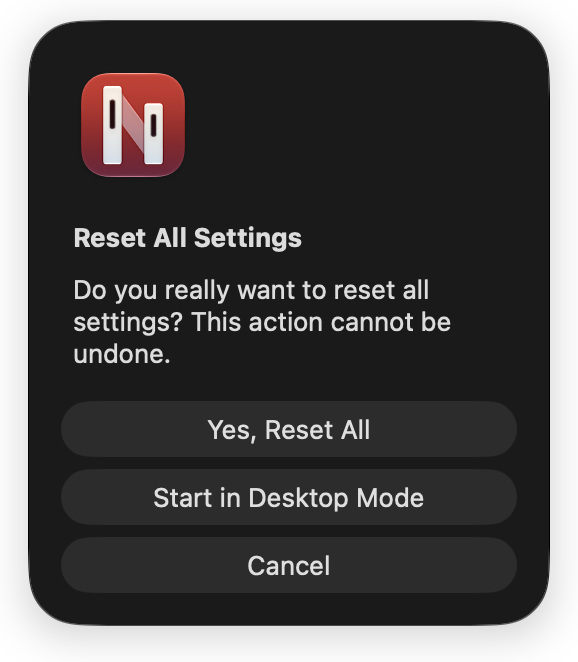
This resets all settings to their defaults. This action cannot be undone. If you change your mind, choose Cancel and everything stays as it is.
The reset applies to this Mac. Your sign-in data is deleted as well, so Netmo 2 treats you as signed out. You need to sign in with Netatmo again, and the welcome window appears again.
Note on iCloud: The settings stored in iCloud are deleted as well. Other Macs keep their settings and upload them to iCloud again at their next change.
If you only want to start in desktop mode because the app is nowhere to be seen, choose Start in Desktop Mode instead. You can find more in the article Netmo 2 is not visible after launch.